Receipt Organization for Taxes: Beat the Year-End Scramble

Tax season doesn’t have to mean tearing through shoeboxes and old email threads in a panic. With a system you actually follow — not an ideal system you built once and abandoned — keeping receipts organized at home is mostly about reducing friction at the point of capture, not at the point of filing.
This guide covers both paper and digital workflows, breaks down which receipts actually matter, and explains how to structure your storage so a 20-minute sort each month keeps you audit-ready all year.
Why Most Home Receipt Systems Fall Apart
The usual failure isn’t that people lack folders. It’s that the system requires too many steps at the wrong moment — when you’re carrying groceries, coming off a work call, or sitting in a parking lot after a client dinner. If organizing a receipt takes more than 30 seconds, it accumulates instead.
A second common failure: people save everything or nothing, depending on anxiety level. Both extremes waste time. Saving a grocery store receipt “just in case” creates noise that buries the receipt that actually matters — the one for the home-office router or the mileage-tracked business trip.
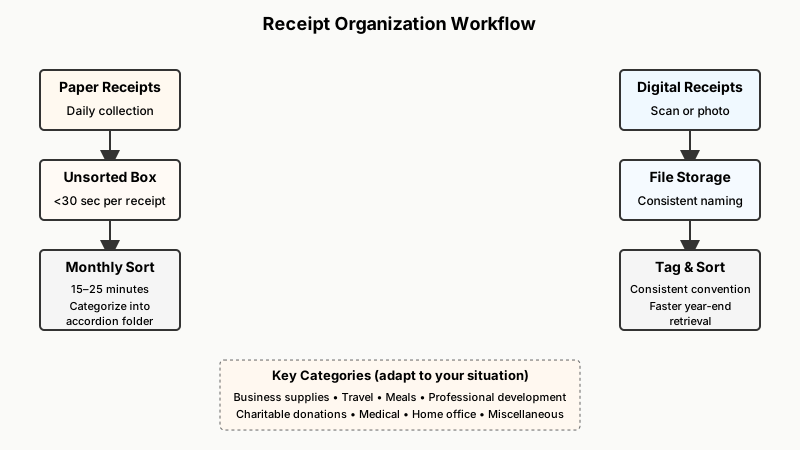
The fix is a two-part approach: a fast capture habit and a periodic sort habit. The capture step is forgiving (throw it in a bin); the sort step is deliberate (spend 20 minutes monthly categorizing what’s in the bin).
Piles of paper receipts are often just one symptom of a larger clutter problem, which is why How to Declutter Your Home Step by Step (That Actually Works) is a useful place to start.
Which Receipts Actually Matter for Taxes
Not all receipts carry equal weight. Before building storage, know what you’re storing and why.
For self-employed individuals and freelancers
- Business supplies and equipment — anything used more than 50% for business
- Home office costs — a proportional share of rent, utilities, or mortgage interest if you use a dedicated workspace
- Travel and transportation — flights, hotels, parking, tolls, and mileage logs
- Meals with business context — typically only the portion the IRS allows as deductible; keep the receipt and a note of who attended and the business purpose
- Professional development — courses, books, software subscriptions, professional memberships
- Health insurance premiums — if you pay them yourself
For employees who itemize deductions
- Charitable donations — cash contributions over a certain threshold require written acknowledgment from the organization, not just a bank statement
- Medical expenses — only amounts above the applicable percentage of adjusted gross income are deductible, so minor medical receipts rarely matter unless costs are significant
- Mortgage interest and property tax statements — usually captured on year-end forms (Form 1098), not individual receipts
- Energy-efficiency home improvements — if relevant tax credits apply in your jurisdiction
What you can usually skip
Groceries, personal clothing, most utility bills (unless you’re claiming home office), restaurant meals with friends, and everyday personal purchases almost never belong in your tax file. Including them clutters your system and wastes sorting time.
Building a Simple Paper System at Home
Paper receipts aren’t going away — some vendors still issue only paper, and some expenses (like parking meters) don’t generate digital proof at all.
What you need:
- One open-top box or a large envelope labeled “Unsorted” — this is the collection point
- A small accordion folder or a set of labeled manila envelopes for categories
- A stapler and a pen
Categories to label (adapt to your situation):
- Business supplies
- Travel / transportation
- Meals (business)
- Professional development
- Charitable donations
- Medical
- Home / utilities (if claiming home office)
- Miscellaneous / unclear
The monthly sort routine: On the first weekend of each month, empty the unsorted box into your accordion folder. Write a brief note directly on any meal or travel receipt while the memory is fresh — who you met, what you discussed, where you were going. Staple related receipts together (hotel folio + credit card slip). Drop the rest into their category. The whole thing should take 15–25 minutes.
Thermal receipt tip: Thermal paper fades badly, sometimes within a few months. If a receipt is important, photocopy it or photograph it on the same day you receive it. Don’t count on the original to survive a year in a folder.

Going Digital: The Systems That Hold Up in Practice
Digital storage solves the fading problem and makes year-end sorting faster, but only if you commit to a consistent naming or tagging convention from the start.
If you’re building a digital archive for receipts, the same principles of consistent naming and folder logic apply, as explained in How to Organize Digital Photos: A Step-by-Step System.
Smartphone scanning apps
Dedicated receipt apps — such as Dext (formerly Receipt Bank) or Expensify — photograph receipts, extract merchant name and amount via OCR, and sort them into categories. They’re most useful for self-employed people with high receipt volume. Basic features on most apps are free; advanced rules and accounting integrations cost a monthly fee.
If you prefer not to pay for an app, your phone’s native document scanner (built into iOS Files or Google Drive) works fine. The key discipline: scan immediately, name the file descriptively (2026-07-clientdinner-Marias.jpg), and drop it into a pre-made folder structure in the same session.
Folder structure for cloud storage
A clean folder hierarchy in Google Drive, iCloud Drive, or Dropbox:
Taxes/
  Business Expenses/
    Supplies/
    Travel/
    Meals/
    Software & Subscriptions/
  Donations/
  Medical/
  Home Office/
  Year-End Forms/   ← W-2s, 1099s, 1098s, etc.
Keep the year-end forms folder separate from expense receipts — mixing them creates confusion when you’re searching in a hurry.
Email receipt management
For online purchases, don’t rely on searching your inbox at tax time. Create a folder (or Gmail label) called “Receipts – Tax Relevant” and move qualifying receipts there on receipt. Set a filter if your volume is high: any email with “order confirmation” or “receipt” from specific vendors can be auto-labeled, but review monthly so junk doesn’t pile up.
What about photos vs. PDFs?
For IRS purposes, digital images of receipts are generally accepted as long as they’re legible and reproducible. The IRS Revenue Procedure 98-25 and Publication 583 address electronic record-keeping for small businesses. Keep images at a resolution where text is readable without zooming strenuously — most phone camera defaults exceed this easily.
The Hybrid Approach (Best for Most People)
Few people are purely paper or purely digital. A practical hybrid:
- At the point of purchase: Paper receipt goes into your wallet pocket or a small envelope in your bag. Digital receipt stays in email or the merchant’s app.
- End of each week (5 minutes): Pull paper receipts from your wallet. Scan the tax-relevant ones immediately; recycle the junk. Star or label the relevant email receipts.
- First of each month (20 minutes): Move starred emails into your tax folder. Do a quick review of scanned images to confirm they’re readable. Dispose of physical receipts that are now safely scanned.
- End of tax year (60–90 minutes): Export or compile your organized folders. Hand off to your tax preparer or import into your tax software. Because you’ve been sorting monthly, this session is review, not reconstruction.
The key difference between this and a system that collapses: the weekly step is five minutes, not fifty. If a step takes too long, it becomes avoidable.
How Long to Keep Tax Records
The IRS generally has three years from the filing date to audit a return in which it suspects a good-faith error, and six years if it suspects underreported income by more than 25%. Keep records at least three years; keep them six years if your income situation is complex. Employment tax records warrant four years.
Property-related records — improvement costs, purchase documents — should be kept as long as you own the property, plus the applicable period after you sell it, because they affect your cost basis.
For most people: a rolling six-year retention policy, applied to a clearly labeled folder per tax year, covers all realistic scenarios without turning your hard drive into an archive.

Frequently Asked Questions
Do I need original paper receipts, or will a photo suffice?
For most personal and small-business tax purposes in the US, a clear digital image of a receipt is acceptable. The IRS expects records to be legible, accessible, and reproducible — a high-resolution photo satisfies that. Keep the original if the amount is large or the transaction is unusual, just to be safe.
What if I lost a receipt for a legitimate expense?
If you lose a receipt, you’re not automatically disqualified from claiming the expense. A bank or credit card statement showing the amount, payee, and date provides supporting evidence. For meals or travel, a contemporaneous note (a calendar entry, an email to the client from that day) helps establish the business purpose. Reconstruct what you can and document your reconstruction process.
Should I keep bank statements and credit card statements too?
Yes — they serve as a corroborating layer. If a receipt goes missing or fades, a statement showing the charge, date, and merchant confirms the expense happened. Digital statements downloaded as PDFs and stored in your year-end folder cost nothing to keep.
How do I handle cash expenses with no receipt?
Note the expense immediately in a log or note-taking app: date, amount, vendor, and business purpose. A consistent contemporaneous log carries real weight if you’re ever questioned. For mileage, the IRS requires a log showing date, destination, business purpose, and miles driven — an odometer reading or a route map helps.
Is spreadsheet tracking enough, or do I need special software?
A well-maintained spreadsheet works perfectly well for moderate expense volumes — list date, vendor, category, amount, and a receipt reference code matching your scanned files. Dedicated apps save time when volume is high or when you need automatic accounting integration, but they’re not required. The best tool is the one you’ll actually use consistently.