How to Write a Better To-Do List: Why Fewer Items Beat Fifteen

Most to-do lists fail before lunch. You write down fifteen things, cross off two, and carry the rest forward until the list becomes a monument to guilt rather than a planning tool. The problem usually isn’t motivation — it’s structure. A well-written list is a decision-making system, not just a memory aid. Here’s how to build one that actually works.
1. Start With a Brain Dump, Then Edit Ruthlessly
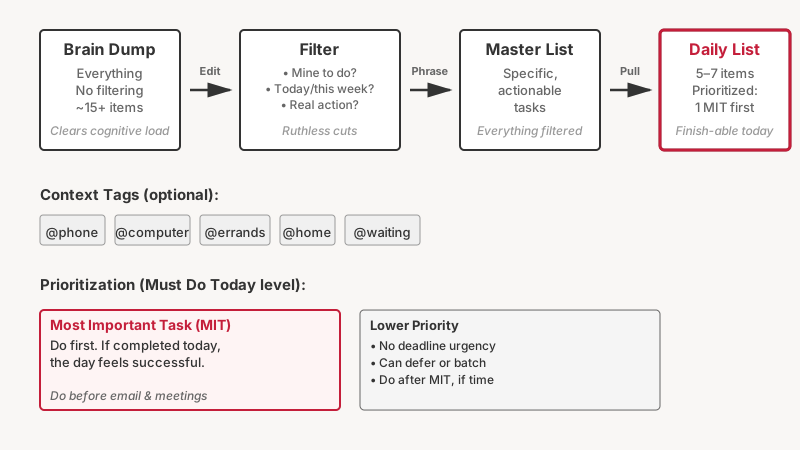
Before you write the list you’ll actually use, empty your head completely. Write every task, errand, worry, and obligation onto a piece of paper or a blank digital note — no filtering allowed. This clears cognitive load and gives you the raw material to work with.
Then comes the critical step: cut it down. Ask three questions about every item:
- Is this actually mine to do? If someone else owns it, move it to a delegation note.
- Does it need to happen today (or this week)? If not, it belongs on a someday list or a calendar, not your active list.
- Is this a real action, or a vague goal? “Work on presentation” isn’t a task. “Write the opening slide for the Q3 pitch” is.
Most people skip this editing pass. That’s why their lists stay bloated and paralyzing.

2. Write Tasks as Specific, Actionable Sentences
The single biggest upgrade you can make to any list is changing how you phrase each item. Vague entries create a mental stall — your brain has to re-interpret the task every time you look at it, which adds friction.
Compare these pairs:
| Vague | Specific and Actionable |
|---|---|
| “Email Mark” | “Email Mark to confirm Thursday’s meeting time” |
| “Gym” | “30-minute run, treadmill, Zone 2 pace” |
| “Report” | “Draft executive summary section of the July report” |
| “Call dentist” | “Call Dr. Patel’s office to book a cleaning” |
Each specific version answers: what exactly am I doing, and to what end? When you sit down to work, you can start immediately instead of spending 90 seconds figuring out what the task even means.
A useful prompt: start every task with a verb. “Review,” “Write,” “Call,” “Schedule,” “Pay,” “Research.” Verbs make tasks feel concrete and completable.
3. Limit Your Daily List to Five to Seven Items
This one feels counterintuitive. Surely a longer list means more gets done? In practice, the opposite tends to be true.
When a list has twenty items, your brain treats it as an overwhelming block rather than a sequence of decisions. You tend to cherry-pick the easiest tasks and avoid the important ones. Research in behavioral psychology shows that people feel more accomplished — and actually complete more meaningful work — when their lists are short enough to finish.
A daily list of five to seven tasks forces you to prioritize. If you can only put five things on today’s list, you have to decide which five matter most. That decision is itself a productivity act.
To make this work in practice:
- Keep a master list (or backlog) of everything you need to do eventually.
- Each morning (or the night before), pull a handful of items from the master list onto your daily list.
- Treat the daily list as a commitment, not a wish list.
If you finish early, pull from the master list. You’ll rarely be bored.
4. Use Context or Category Tags
Not all tasks can happen anywhere. “Call the insurance company” requires a phone and probably a quiet environment. “Review contract” requires a computer and the document. “Buy olive oil” requires being near a shop.
Grouping tasks by context — a method borrowed from David Allen’s Getting Things Done framework — prevents the frustration of looking at a task you can’t actually do right now. It also lets you batch similar work together, which reduces the switching cost between tasks.
Simple context tags to start with:
- @phone — calls and voice messages
- @computer — anything requiring a screen
- @errands — tasks you do outside the home or office
- @home — tasks tied to your physical space
- @waiting — items where you’re waiting on someone else
You don’t need special software for this. A few handwritten columns or a simple note app with tags works fine.

5. Prioritize With a Light Touch — Not a Complex System
Prioritization frameworks abound: the Eisenhower Matrix, MoSCoW scoring, ABC ranking, the Ivy Lee method. Each has real merit. But the mistake many people make is spending more time prioritizing than doing.
The simplest effective method: mark just one item on your list as your Most Important Task (MIT) — the one thing, if completed, that would make today feel successful. Do that item first, before you check email, before you get pulled into meetings.
Beyond that single MIT, a rough three-tier system is sufficient for most people:
- Must do today — deadlines, time-sensitive commitments
- Should do today — high-value work with flexible timing
- Nice to do — lower priority; moves to tomorrow if needed
Avoid using five priority levels or color-coding six categories. The more complex the system, the more time you spend maintaining the system instead of working.
6. Write Your List the Night Before
This one is under-appreciated. Writing tomorrow’s list before you go to sleep has two meaningful benefits:
First, it helps you wind down. The act of capturing outstanding tasks onto paper gives your brain permission to stop rehearsing them. Psychologist Roy Baumeister and colleagues conducted research suggesting that writing down a specific plan for incomplete tasks reduces intrusive thoughts about those tasks — essentially freeing up mental bandwidth.
Second, you start the next day already oriented. Instead of spending your most alert morning hours deciding what to do, you can dive straight in. That initial decision-making window — typically the first hour or two after waking — is a limited cognitive resource.
The process takes about five minutes: review what you accomplished today, check what’s due tomorrow, pull five to seven items onto a fresh daily list, done.
If you like the idea of setting things up the evening before, pair this habit with How to Build a Simple Morning Routine That Actually Sticks for a calmer, more predictable start to your day.
7. Review and Retire Your List Regularly
A list that never gets reviewed becomes a graveyard of abandoned intentions. Old tasks accumulate, and the list becomes demoralizing to look at.
Build two review habits:
Daily review (2–5 minutes): At the end of each day, cross off completed items, carry forward genuinely important unfinished tasks, and delete anything that no longer matters. Don’t carry items forward automatically — re-decide whether each one earns a place on tomorrow’s list.
Weekly review (15–20 minutes): Once a week, go through your master list. Look for tasks that have been sitting there for three or four weeks: either schedule them with intention, delegate them, or accept that you’re not going to do them and delete them. A clean master list is one you can actually trust.
This review process is what separates a list that stays useful from one that slowly falls apart.

Choosing Your Format: Paper vs. Digital
Neither paper nor digital to-do apps are universally better. The right choice depends on your habits and work context.
Paper works well if: you find screens distracting, you do most of your work in one location, or you derive satisfaction from the physical act of crossing things off. A simple A5 notebook or index card system (the “Autofocus” method uses index cards) can outlast any app subscription.
Digital works well if: your tasks span multiple devices and locations, you need reminders and due dates, or you collaborate with others. Apps like Todoist, Things 3, and Microsoft To Do each have solid reputations for straightforward list management — none of them require you to learn a complex methodology to get started.
One practical tip: don’t maintain your list in more than one place at a time. A paper list and a digital list running in parallel means double the maintenance and half the trust. Pick one system and consolidate.
A Note on What Lists Can’t Do
A to-do list is a planning tool, not a motivational one. If you’re consistently not completing your lists, the problem may not be the list format — it could be overcommitment, unclear priorities at work, or tasks that genuinely need to be delegated or declined. A well-written list will surface those underlying problems faster, which is itself useful information.
The goal is a list you finish most days — or at least one where the unfinished items are genuinely lower priority, not the ones you were avoiding. That shift, from a list that makes you feel behind to one that makes you feel in control, is what good list design actually delivers.
For the bigger-picture items your daily list shouldn’t carry alone, see How to Set Realistic Personal Goals (and Actually Hit Them) to keep long-term ambitions moving alongside your daily tasks.
Putting It Together
You don’t need to adopt all seven strategies at once. Start with two: write tasks as specific, actionable sentences and limit your daily list to five to seven items. Those two changes alone will produce a noticeable difference within a week.
Once those feel natural, add the evening planning habit, then the weekly review. Build the system incrementally, and you’ll find yourself with a planning practice that holds up under pressure — not just on quiet Tuesdays when everything is easy.