How to Shred Sensitive Documents Safely: Beyond The Trash Bin

Sensitive documents sitting in your recycling bin are basically an open invitation. Identity thieves don’t need to be technically sophisticated — a handful of bank statements or a single piece of mail with your Social Security number is often enough to open fraudulent accounts or file fake tax returns in your name.
So the question isn’t really whether to shred — it’s how to do it right, and which documents actually need that treatment. This guide covers both, along with options for people who don’t own a shredder and need a reliable alternative.
Which Documents Actually Need to Be Shredded
Not every piece of paper is worth dragging to a shredder. Focus your effort on documents that contain:
- Full Social Security numbers (or even partial ones)
- Account numbers — bank, credit card, investment, utilities
- Passwords, PINs, or security questions written on paper
- Medical records, prescriptions, or insurance Explanation of Benefits (EOB) forms
- Tax returns and supporting documents (W-2s, 1099s, receipts)
- Pay stubs and salary letters
- Legal documents — contracts, wills, divorce papers, property records
- Old passports, expired IDs, or visa documents
- Pre-approved credit card offers — even blank ones
- Voided or cancelled checks
Routine mail without personal details — a grocery flyer, an anonymous catalog — can go straight into recycling. But when in doubt, shred it. The cost of five extra seconds is nil compared to untangling identity theft.

Sorting out what to shred often surfaces as part of a bigger cleanup effort, and our guide How to Declutter Your Home Step by Step (That Actually Works) can help you tackle the rest of the clutter at the same time.
The 7 Safest Ways to Destroy Sensitive Documents
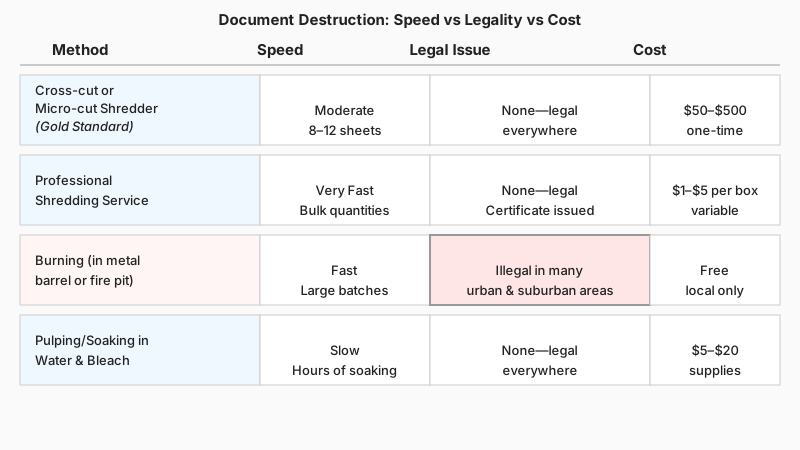
1. Cross-Cut or Micro-Cut Shredder (The Gold Standard)
Not all shredders are equal. Strip-cut models — the cheapest kind — slice paper into long vertical ribbons that can theoretically be reassembled. Cross-cut shredders produce small rectangular confetti, making reconstruction impractical. Micro-cut shredders go further still, turning a single sheet into hundreds of tiny particles no larger than a grain of rice.
For home use, a cross-cut shredder is sufficient for most people. If you handle highly confidential material — legal, medical, or financial records — a micro-cut model is worth the modest price premium. Look for a DIN 66399 security level rating: Level P-4 (cross-cut) or P-5 (micro-cut) covers most household needs; P-6 and P-7 are standards used by government agencies.
Practical tip: Run the shredder in short bursts rather than feeding a thick stack at once. Overloading causes jams, motor burnout, and partially shredded pages that leave readable sections intact. Most consumer shredders handle 8–12 sheets at a time.
2. Professional Shredding Services
If you have boxes of old documents — a cleared-out filing cabinet, years of archived tax returns — a professional shredding service is often more practical than running everything through a home unit.
Services like Shred-it, Iron Mountain, and local document destruction companies offer two main options:
- Drop-off shredding: You bring sealed bags or boxes to a facility. Many office supply chains host periodic community shredding days.
- Mobile on-site shredding: A truck with an industrial shredder comes to your location. You watch the documents destroyed in real time.
Legitimate services issue a Certificate of Destruction — a documented record confirming that your materials were securely destroyed. This matters if you’re disposing of HIPAA-regulated medical records or business documents with legal retention requirements.
3. Burning (Where Legal and Safe)
Open burning of paper is legal in some rural and suburban jurisdictions and remains genuinely effective — fire is thorough. Before you consider this option, check your local regulations. Many municipalities prohibit residential burning outright; fire bans in dry seasons can make it dangerous regardless of legality.
If burning is permitted:
- Use a metal burn barrel or a dedicated fire pit, not a casual bonfire pile
- Keep a water source nearby
- Never burn plastics, glossy paper coated in chemicals, or credit cards
- Stir the ashes to ensure every page fully combusts — partially burned documents can still be readable
This method works well for very large quantities in appropriate settings, but it’s impractical (and often illegal) in an urban apartment.
4. Pulping or Soaking in Water
Soaking paper in water and physically breaking it down into pulp is a low-tech but surprisingly effective method. Submerge documents in a bucket of warm water with a small amount of bleach for a few hours, then stir aggressively. The result is an illegible mash. Let it dry before disposal or pour it into a compost bin.
This method handles small volumes well — a handful of sensitive pages you need to dispose of without a shredder. It’s slow, messy, and not ideal for bulk quantities.
5. Blackout Stamps and Security Pens
For single pieces of paper where the sensitive information is limited to a few lines — a name and address on an envelope, for example — a blackout stamp or security marker pen can render the text unreadable. These tools use an opaque, cross-hatched ink pattern that obscures text without requiring any machinery.
A blackout stamp is not a replacement for shredding entire documents. Use it selectively: on envelopes before tossing a utility bill, on the address panel of a mailing label, or on a name printed on a package. It won’t protect a multi-page bank statement.

6. Scissors and Manual Cutting
Low-tech, but not useless for occasional use. Cut documents into pieces no larger than a half-inch square — smaller than that and it becomes meaningfully difficult to reconstruct. The practical limitation is time: cutting up a 10-page bank statement by hand takes several minutes and is tedious enough that most people quit before finishing.
If you go this route, divide the pieces into two separate bags and dispose of them in different trash pickups. It’s not as secure as micro-cut shredding, but it adds meaningful friction for anyone going through your garbage.
7. Electronic Document Destruction (for Digital Files)
If you’ve transitioned to paperless billing and keep digital copies, the destruction process shifts to your hard drive and cloud storage. Simply deleting a file doesn’t remove it — the data typically persists until overwritten. For truly secure digital deletion:
- Use software-based file wiping tools that overwrite data multiple times (Eraser for Windows, Secure Empty Trash on macOS)
- Physical destruction of a hard drive (drilling, degaussing, or using a certified e-waste destruction service) is the most reliable approach for decommissioned devices
- Encrypt cloud-stored files and use a provider that offers verifiable deletion
This belongs in any document security conversation because a scan of a bank statement stored on an old laptop is just as vulnerable as the paper original.
How Long to Keep Documents Before Shredding Them
Knowing when to shred is as important as knowing how. Destroying documents you still need — especially tax records — can cause real problems.
Here are general retention guidelines (consult a financial advisor or accountant for specifics relevant to your situation):
| Document Type | Suggested Retention Period |
|---|---|
| Tax returns and supporting documents | 7 years |
| Bank statements | 1–3 years |
| Pay stubs | 1 year (until reconciled with W-2) |
| Medical records | Indefinitely, or until no longer active |
| Utility bills | 1 year |
| Credit card statements | 1–3 years |
| Property purchase records | Permanently (or 7 years after sale) |
| Receipts for major purchases | Duration of warranty or ownership |
The IRS generally has three years from your filing date to audit a return, and up to seven years if it suspects income was under-reported — which is why the seven-year rule is a commonly cited benchmark for tax documents.

Common Shredding Mistakes to Avoid
Shredding only financial documents. Medical and legal documents carry sensitive data too. A discarded prescription bottle label, for instance, contains your name, doctor’s name, and the medication — enough to attempt pharmacy fraud.
Putting the shredder in a hard-to-reach place. Out of sight means out of habit. Keep your shredder next to your desk or wherever you sort mail. Convenience drives consistency.
Letting a pile build up. A box of “to be shredded” documents that sits for months is a security risk. If your home is broken into or a guest goes through your things, those documents are as exposed as if they were in the trash.
Ignoring digital media. Old CDs, USB drives, and floppy disks (yes, some people still have them) can hold sensitive files. Optical discs can be physically shredded with most cross-cut models rated for media, or snapped in half and disposed of separately. USB drives should be physically destroyed before disposal.
Shredding documents you’re legally required to keep. If you’re a small business owner or freelancer, there are record-keeping obligations that vary by jurisdiction. A quick review with an accountant before a mass purge can save headaches.
Choosing a Home Shredder: What to Look For
If you’re buying a shredder for the first time, here’s what actually matters beyond the price tag:
- Cut type: Cross-cut minimum; micro-cut preferred
- Sheet capacity: How many sheets it handles per pass — 10–12 is standard for home use
- Run time and cool-down: Consumer shredders typically run for 5–10 minutes continuously before needing a cool-down period. Models with longer duty cycles are worth paying for if you have volume to handle
- Bin size: A larger bin means fewer interruptions to empty it
- Credit card and CD/DVD slots: Useful if you routinely destroy old payment cards and optical media
- Jam-proof mechanism: This alone saves enormous frustration
Brand names frequently cited by consumer review organizations include Fellowes, AmazonBasics, and Bonsaii — though specific models change often, so check current reviews before purchasing.
If you’re setting up a shredder at home, it pairs naturally with the broader project of getting your workspace in order, so check out 12 Tips for Organizing a Home Office That Actually Works for more ideas.
Conclusion
Document security isn’t complicated, but it requires deliberate habit. The single most effective thing most households can do is keep a cross-cut shredder in a convenient spot and use it routinely — not just during a once-a-year clean-out.
For bulk disposal, professional shredding services offer peace of mind and a paper trail of destruction. For occasional needs without equipment, water-pulping or secure blackout stamps handle the job. And don’t forget digital files — a paper shredder handles half the problem if your old laptop still holds the same statements in scanned PDFs.
Start with the documents most likely to enable identity theft — Social Security numbers, account numbers, tax returns — and work outward from there. That’s a practical, sustainable approach that doesn’t require paranoia, just consistency.