12 Tips for Organizing a Home Office That Actually Works

Setting up a home office is one thing. Keeping it functional — day after day, project after project — is something else entirely. Clutter accumulates, cables multiply, and before long the space that was supposed to boost your focus becomes another source of low-grade stress.
These twelve tips cut through the usual vague advice. Each one is specific, actionable, and grounded in how a real workspace actually gets used.
1. Start With a Brutal Purge
Before you buy a single organizer or shelf bracket, remove everything from the space. Every pen, every cable, every sticky-note pad. Spread it on a table or the floor and sort into three piles: keep, relocate, discard.
Most people discover they own four pairs of scissors, seventeen charging cables for devices they no longer have, and a printer they used once in 2019. Getting rid of dead weight first means you only organize what you actually need — not everything you’ve accumulated.
A useful rule: if an item hasn’t been touched in six months and has no seasonal excuse, it goes.
2. Match the Layout to Your Workflow
Not every home office should look like a magazine photo. The layout that works for a video editor with three monitors and a drawing tablet is completely different from what a writer or an accountant needs.
Before moving furniture, trace your typical workday mentally:
- What do you reach for first thing in the morning?
- What sits on your desk all day versus what you use once?
- Where do you look when you’re thinking?
High-frequency items belong within arm’s reach. Low-frequency items — reference binders, backup drives, tax files — belong in secondary storage further away. Arranging the room around actual behavior, not aesthetic preference, is what makes the difference.

3. Tame Cable Chaos Once and for All
Cables are the single most consistent complaint in home office organization, and for good reason: they tangle, they collect dust, and they make a space look chaotic even when everything else is in order.
A few solutions that genuinely help:
- Cable clips or adhesive cable guides run cables along desk legs or the wall, out of sight and off the floor.
- A power strip with individual switches lets you cut power to devices you’re not using and keeps all your plugs in one manageable block.
- Cable sleeves or spiral wrap bundle multiple cables traveling the same route into one clean line.
- Label your cables with small cable tags or even a strip of masking tape and a marker — you’ll thank yourself the next time something stops charging and you’re tracing wires behind the desk.
If you’re building from scratch, route cables before the desk goes against the wall. Retrofitting is always harder.
4. Think Vertical
Floor space in a home office is usually limited. Wall space almost never gets fully used. Floating shelves, pegboards, wall-mounted file holders, and monitor arms all move storage and equipment off the desk surface and into the vertical plane.
A monitor arm alone can free up a meaningful footprint on a small desk — and it lets you adjust screen height and angle properly, which matters for your neck and eyes over a long workday. Pegboards (the classic tool-shop solution) work equally well for office supplies: hooks hold scissors, headphones, and small bins for pens and paper clips.
The key is to keep frequently accessed vertical storage at eye level or just below. Anything you have to stretch for or crane to read should be in a different spot.
5. Designate Zones — Even in a Small Space
A functional office usually contains at least three distinct activity zones:
- Primary work zone: your desk, monitor, keyboard — the core of your day.
- Reference zone: files, binders, books, physical documents you consult regularly.
- Supply zone: paper, envelopes, extra ink, batteries — the operational stock.
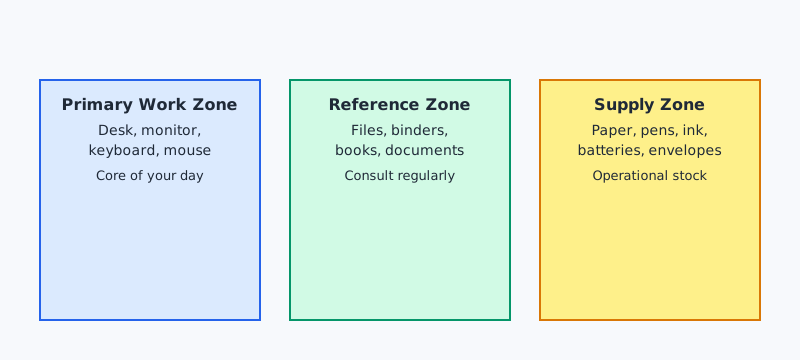
Even if your office is a converted corner of a bedroom, you can still zone it. A small rolling cart separates the supply zone from the desk. A bookshelf behind you becomes the reference zone. The mental act of giving each category a defined home means things get put back where they belong, because there is a clear place they belong.

6. Build a Document System You’ll Actually Use
Paper is the fastest route to clutter. The goal isn’t a paperless office (noble, but rarely fully achievable) — it’s a paper system with clear inputs and outputs.
A simple three-tray system on the desk covers most needs:
- In: documents that have arrived and need action
- Pending: items waiting on someone else before you can close them
- Out/File: completed documents ready to be filed or scanned and shredded
For the filing cabinet itself, label folders specifically rather than broadly. “Insurance” is a weak label that becomes a dumping ground. “Home Insurance — Policy Docs” and “Health Insurance — Claims” are labels you can find something in without rifling through the whole drawer.
For digital documents, the same logic applies: a clear folder hierarchy with consistent naming conventions beats a desktop full of files named “document_final_FINAL_v3.”
7. Control the Desk Surface
A clear desk surface isn’t about minimalism for its own sake — it’s about cognitive load. Research in environmental psychology consistently links visual clutter with elevated stress and reduced ability to focus. When your workspace is visually noisy, your brain is doing background processing it doesn’t need to do.
The discipline here is deciding what earns permanent desk space. Candidates: your monitor, keyboard, mouse, a lamp if needed, and perhaps one analog item (a notepad, a single pen cup). Everything else is a guest.
A small tray or landing pad near the desk edge is useful for items in active use — it contains the drift without banning it entirely. At the end of each workday, clear the tray. The ritual takes ninety seconds and resets the space for tomorrow.
8. Get Lighting Right
Poor lighting causes eye strain, headaches, and low-grade fatigue that accumulates across a workday. It also makes a space feel smaller and more oppressive than it needs to.
Natural light is preferable, but position your desk so the window is to the side — not directly behind your monitor (glare) or directly in front of your face (squinting). A desk lamp with adjustable color temperature lets you shift from a cooler, energizing light during focused work to a warmer tone for calls or reading.
If you’re on video calls, front-facing light makes a significant difference in how you appear on screen. A simple ring light or a lamp placed at eye level in front of you is more effective than an expensive webcam if your current lighting is poor.
9. Use Containers That Close
Open bins and trays on shelves look fine when they’re organized. They look chaotic the moment they’re not — which is most of the time. Containers with lids, closed boxes, or drawer units keep supply areas looking clean regardless of what’s inside them.
This doesn’t mean buying expensive matching sets. Shoeboxes covered in craft paper work. A set of identical cardboard magazine holders from a budget store works. Consistency of appearance matters more than cost. When storage containers match in color or style, the space reads as ordered even if the contents are somewhat jumbled.

10. Protect Yourself From Notification Creep
Organization isn’t only physical. A well-organized home office controls digital interruptions as deliberately as it controls physical clutter.
Practical steps:
- Keep non-work apps off your work browser profile.
- Set your phone face-down or in a drawer during focus blocks.
- Use a dedicated work email browser tab rather than keeping it pinned all day.
- Batch your notification-checking rather than responding in real time.
These aren’t productivity hacks — they’re hygiene. An organized workspace you can’t actually focus in because your phone buzzes every four minutes has solved the wrong problem.
Once your physical space is under control, pair it with the digital-focused strategies in 12 Remote Work Productivity Tips That Actually Work to keep distractions from creeping back in.
11. Create a Start and End Ritual
One advantage a physical office has over a home office is a commute — a mental buffer that transitions you in and out of work mode. Without it, home workers often find the office bleeds into personal time in both directions.
A brief, consistent ritual compensates for this. It doesn’t need to be elaborate:
- Start: sit down, open your task list, write three priorities for the day.
- End: clear the desk surface, close all work tabs, write one note about where to pick up tomorrow.
The physical act of closing down the space signals to your brain that work is done. It also means you arrive to a clean desk each morning, which is its own small motivation.
12. Do a Monthly Reset — Not Just an Annual One
Most organization advice suggests a big annual overhaul. The problem is that entropy works on a shorter timeline. Papers accumulate, supplies run low, cables drift, and habits slip in the course of weeks, not months.
A fifteen-minute monthly reset is far more effective than a four-hour annual one:
- Return every item to its designated zone.
- Restock supplies that are running low before you run out.
- Remove anything that has drifted in from outside the office.
- Check whether your current layout is still working or whether something about your workflow has changed.
The goal isn’t a pristine showroom. It’s a space that supports the way you actually work — and a monthly reset keeps it calibrated to that goal.
Putting It Together
Organizing a home office is not a one-time project. It’s an ongoing negotiation between how you work and how your space supports that work. Start with the purge, build systems around your actual behavior, and maintain them with short regular resets rather than hoping for willpower during a big annual clean.
The payoff is real: a space you walk into with clarity instead of low-level dread, and one that closes down at the end of the day instead of following you into the evening.