How to Set Up a Homework Station for Children

Setting up a dedicated homework station is one of the more practical things a parent can do to reduce the nightly battle over where, when, and whether schoolwork gets done. This isn’t about buying matching furniture or installing task lighting with a three-step dimmer. It’s about choosing a spot and arranging it so that sitting down to work is the path of least resistance.
The ideas below cover physical setup, supplies, digital boundaries, and how to adjust the station as children grow — because what works for a seven-year-old is rarely what works for a twelve-year-old.

Choosing the Right Location
The first choice is also the most debated: kitchen table or bedroom desk?
Both work, and the honest answer is that consistency matters more than location. A spot that gets used every day beats the theoretically perfect setup that nobody actually sits at.
That said, a few location principles hold up:
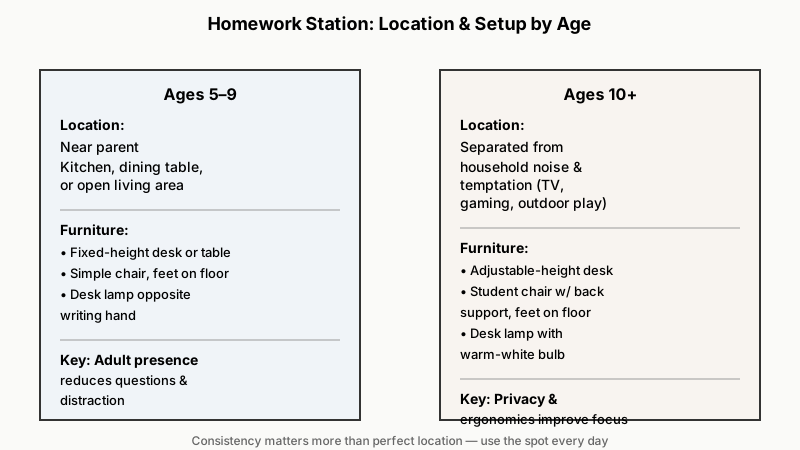
- Younger children (roughly ages 5–9) tend to do better near a parent — a kitchen counter, dining table, or an open corner of the living area. They ask more questions and get distracted less when an adult is casually present.
- Older children (roughly ages 10 and up) often work better with some separation from household noise, especially once homework involves reading comprehension or longer writing tasks.
- Avoid placing the station directly next to a TV, a gaming console, or a door that leads to outdoor play. Proximity to temptation is a real friction point.
- Natural light from a window is pleasant but face it sideways (light coming from left or right), not directly into the eyes or creating screen glare.
If space is limited, a corner of a shared bedroom works well — even a foldable wall-mounted desk can carve out a zone that signals “this is where work happens.”
If you’re weighing similar spot-selection questions for another corner of the house, How to Set Up a Cozy Reading Nook: Choosing Your Spot Before Furniture walks through the same kind of before-furniture thinking.
The Physical Setup: Furniture and Ergonomics
An uncomfortable chair or a desk at the wrong height creates real fatigue and fidgeting — and those get blamed on distraction when they’re actually physical discomfort.
Desk Height
When a child sits with their feet flat on the floor (or on a footrest), elbows should rest comfortably on the desk surface at roughly a 90-degree angle. A child whose shoulders hunch up because the desk is too tall, or who slumps because it’s too low, will drift off task faster. Many desks sold for children have a fixed height that quickly becomes wrong — an adjustable-height desk is worth the small premium if you plan to use it for several years.
Chair
A chair with a firm, flat seat and some back support is more useful than a plush, deep-cushioned one. The child’s feet should reach the floor or a firm surface. A simple wooden chair or adjustable student chair outperforms a soft beanbag for focus work every time.
Lighting
Overhead ceiling lights are often too dim or too diffuse for close reading and writing. Add a directional desk lamp positioned on the opposite side from the child’s writing hand — to the left for right-handed children, to the right for left-handed — so the working hand doesn’t cast a shadow over the page. A warm-white bulb (around 2700–3000 K) is comfortable for most work; very blue or cool-white light feels harsh in the evening.

For more ideas on using light and color to make a small study corner feel less cramped, check out How to Make a Small Room Look Bigger: Light, Color, And Tone Tricks.
Supplies: What to Stock, What to Skip
The station should have everything needed for a typical homework session within arm’s reach. Every trip to another room for a pencil or a ruler is a chance for the session to derail.
Core supplies to keep at the station:
- Pencils (several sharpened), an eraser, and a pencil sharpener
- Colored pencils or crayons (for younger grades especially)
- Ruler, scissors, glue stick
- A small stapler
- Sticky notes and index cards
- A spiral notebook or scratch paper for working through problems
- Any subject-specific supplies the child uses regularly (protractor, graph paper)
What to skip: Toys, games, fidget devices (unless specifically recommended for a child’s focus needs), and any object that becomes a distraction during actual work time. A whiteboard or corkboard on the wall nearby can double as a visual schedule board — that’s genuinely useful, unlike decorative clutter.
A small caddy, a set of cups, or a basic desktop organizer keeps supplies accessible without requiring a second search. The bar for putting something away should be low; if there’s no obvious place for a thing, it ends up on the work surface and becomes visual noise.
Managing Screens and Digital Tools
Most school-aged children now use a tablet, laptop, or Chromebook for at least part of their homework. That’s a given. The challenge is keeping the device a tool rather than a portal to everything else.
Physical positioning
If the child uses a laptop or tablet at the station, position the screen slightly below eye level. A stand that raises the screen and a separate keyboard can help older children who do substantial typing.
Wi-Fi and app boundaries
Rather than a blanket rule (“no internet during homework”), a more workable approach for most families:
- Agree on which sites are open. Specific research sites, the school’s learning management system, and a dictionary are fine. Social media and video platforms are not.
- Use the device’s built-in screen-time or parental controls to block categories of apps during designated homework hours. Both iOS Screen Time and Android’s Digital Wellbeing can schedule downtime or block specific apps by time of day without requiring constant enforcement.
- For younger children who don’t yet need the internet for homework, keep the station screen-free. A simple rule is easier to enforce than a complex exception list.
The phone question
For children who have phones, the single most effective intervention is a physical one: the phone goes in a different room during homework time. Lock boxes, charging stations in the kitchen, and similar solutions work precisely because they remove the decision from the child’s hands. Results with this approach vary, but most families report fewer arguments once the rule is a location habit rather than a repeated individual request.
Routine and Environment: The Invisible Part of the Setup
The physical station works best when it’s paired with a predictable routine. The space trains the brain only if the brain shows up at the same time.
- Set a consistent start time. This doesn’t have to be immediately after school. A 20–30 minute transition break first works well for many children, especially younger ones who’ve been sitting all day. What matters is that the start time is regular.
- Keep ambient noise consistent. Some children work better with low background music; others don’t. The research on background music and focus is genuinely mixed — it likely depends on the child and the task type. Try it both ways rather than assuming. What causes consistent disruption is unpredictable or conversational noise (TV in the background, phone calls, siblings arguing).
- Avoid using the homework station for other activities. If it becomes also the snack spot, the crafts table, and the LEGO table, the “sit down and work” association weakens. The more dedicated the space, the quicker a child’s brain shifts into work mode when they sit there.
Adjusting the Station as Children Grow
A setup that works beautifully at age eight will frustrate a ten-year-old and feel completely wrong at thirteen. Plan for it.
| Age range | Key changes to make |
|---|---|
| 5–7 | Short sessions (15–20 min), parent close by, minimal supplies |
| 8–10 | Introduce a homework planner or assignment checklist; child begins managing supplies |
| 11–13 | Greater independence, consider moving to a private desk; add digital tools as needed |
| 14+ | Treat them like a young adult workspace; they should self-manage schedule and supplies |
The adjustable-height desk, a good lamp, and a consistent location can serve across all these years. What changes is how much oversight you provide and how the digital setup is managed.
Frequently Asked Questions
Does a homework station actually improve grades?
The direct evidence linking a tidy workspace to grades specifically is thin. What a dedicated station reliably does is reduce transition time, lower the frequency of distraction, and build a habit of starting — which are the practical levers that affect how much work actually gets done. Whether that translates to better grades depends on many factors outside the workspace.
What if we live in a small space with no room for a dedicated desk?
A corner of a shared table works, as long as it’s set up consistently — supplies in the same spot, same chair, same time. Some families use a portable “homework kit” (a caddy or small tote that a child unpacks onto the table and repacks when done), which recreates the ritual even without a fixed location.
How do I stop my child from using homework time to play games on the tablet?
Built-in parental controls on iOS, Android, and most Chromebooks let you schedule app downtime or block categories by time of day without requiring manual enforcement every session. Setting this up once is more durable than repeated requests.
Should the homework station have zero background noise?
Not necessarily. Complete silence is harder to maintain than moderate, consistent ambient sound. Many children find low-volume instrumental music or white noise preferable to forced silence. The key word is consistent — unpredictable noise (the TV in the next room, loud conversations) is more disruptive than steady low-level background.
When should I stop checking my child’s homework at the station?
This varies by child, but a general principle: gradually hand ownership of the process to the child rather than removing oversight all at once. By middle school, most children benefit from managing their own assignment list and time, with a parent available for questions rather than supervising every session. The station itself can help — if a homework planner lives there and gets used, you can glance at it without hovering.