How to Keep a Workspace Tidy: Design a System That Fights Friction

Why a Tidy Workspace Actually Matters
A cluttered desk is more than an eyesore. Research from Princeton University’s Neuroscience Institute found that physical clutter competes for your attention and measurably reduces your ability to focus. When your eyes land on a stack of unread mail or a tangle of cables, your brain registers each item as an unfinished task — a low-grade cognitive drain you carry all day.
Beyond focus, a tidy workspace has a practical dimension: you spend less time hunting for things. The average knowledge worker loses roughly 20 minutes a day searching for misplaced items. Over a year, that’s more than 80 hours — two full work weeks.
This article gives you a system, not a pep talk. The strategies below are ordered from the foundational (decisions you make once) to the habitual (small actions that keep entropy at bay).

Start With a Proper Declutter
Everything Out, Then Back In
The most reliable way to reset a chaotic workspace is the full-empty method. Remove everything from your desk, shelves, and drawers. Clean the surfaces. Now, only put back what earns its place.
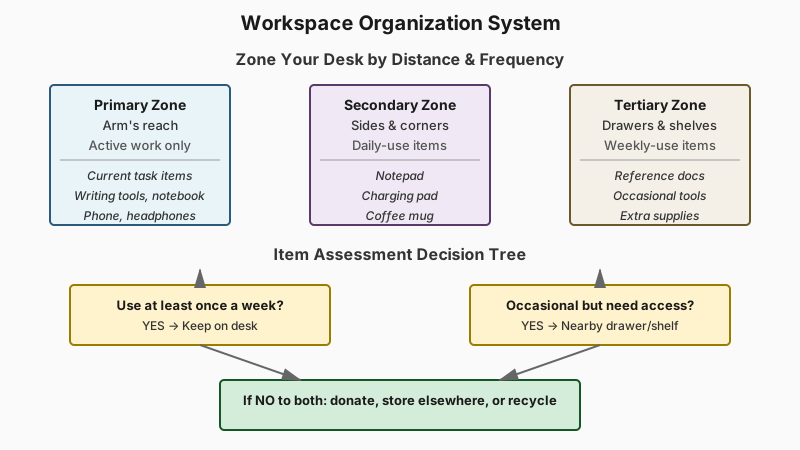
Ask two questions for every item:
- Do I use this at least once a week? If yes, it can live on or near your desk.
- Do I use this occasionally but need it accessible? If yes, it goes in a nearby drawer or shelf.
Anything that fails both tests belongs somewhere else entirely — a storage room, a donation box, or the recycling bin.
The “One In, One Out” Rule
Once you’ve done your initial clear-out, enforce a simple constraint: when something new arrives at your desk — a charger, a book, a decorative item — something of equal size leaves. This isn’t minimalism for its own sake; it’s a cap on accumulation. Clutter doesn’t happen in a single afternoon. It accumulates one object at a time.
Design a System That Fights Friction
Give Every Item a Fixed Home
The reason things pile up is almost never laziness — it’s that items don’t have a defined place. A pen set down “temporarily” becomes the first layer of a pile. A fixed home for every object removes the decision of where to put it, so return becomes as automatic as picking it up.
Start with your highest-traffic items: writing tools, notebook, headphones, phone. Assign each a specific spot and keep it there consistently for two weeks. After that, the behavior becomes reflexive.
To find the right containers and dividers for assigning those homes, check out Best Desk Organizers for a Small Workspace.
Zone Your Desk
Think of your desk as three zones:
- Primary zone (directly in front of you, arm’s reach): only what you’re actively working on right now.
- Secondary zone (sides and corners): tools you use daily — a notepad, a charging pad, a coffee mug.
- Tertiary zone (drawers and shelves within the same room): items used weekly or for reference.
Anything that doesn’t fit a zone doesn’t belong at your workstation. This mental model is borrowed from kitchen ergonomics, and it translates well to any desk setup.

Cable Management Is Not Optional
Loose cables are one of the biggest contributors to visual clutter and are disproportionately annoying to deal with once tangled. A few targeted fixes:
- Cable clips or adhesive cord holders run cables neatly along the back edge of the desk.
- A cable management box hides a power strip and excess cord length under or behind the desk.
- Velcro ties (not zip ties, which you have to cut to adjust) bundle cables that travel together.
For a sit-stand desk or a setup where you move a laptop in and out, a wireless keyboard and mouse eliminate the most problematic cables entirely.
Paper Gets Its Own System
Paper is uniquely persistent clutter because it arrives constantly and requires a decision for disposal. A two-tray inbox/outbox system is the classic solution, but it only works if you actually process the inbox on a schedule.
Try a weekly “paper sweep” — every Friday, go through any paper that landed on your desk. File what needs keeping, act on anything pending, shred or recycle the rest. Most paper that feels urgent when it arrives is completely inconsequential three days later.
For documents you genuinely need long-term, a simple filing system with broad categories (Finance, Contracts, Reference, Active Projects) beats a complex folder hierarchy. The goal is retrieval, not perfect organization.
If paperwork keeps piling up beyond a simple tray, How to Create a Simple Document Filing System That Works walks through building a filing structure that actually holds up over time.
Build Daily and Weekly Habits
The End-of-Day Reset (5 Minutes)
This is the single highest-leverage habit for maintaining a tidy workspace. Before you close your laptop or walk out the door, spend five minutes resetting your desk to baseline:
- Clear anything that doesn’t live on the desk surface.
- Put tools back in their homes.
- Throw away any rubbish — coffee cups, wrappers, sticky notes you’ve acted on.
- Straighten what remains.
Five minutes is not an estimate — time it once and you’ll see. The reason it feels like more is that most people only tidy reactively, when clutter is already overwhelming. Doing it daily keeps the task small.
The Weekly Wipe-Down
Dust and grime are underrated contributors to a workspace that feels chaotic. Once a week — pick a day and anchor it to another routine, like Friday afternoon before you wrap up — wipe the desk surface, your keyboard, your monitor, and any other peripherals. A microfiber cloth handles most of this in two minutes.
A clean surface makes even a moderately busy desk look intentional rather than neglected.
Don’t Let the “Pending” Pile Grow
Most desk piles aren’t random junk — they’re pending decisions. A form to fill out, a book to return, a cable to deal with. The pile grows because each item requires a small action, and you defer it.
The fix is a single, contained “action tray” with an explicit rule: nothing stays in it more than one week. If it’s been sitting there past your weekly sweep, you either do it right now, delegate it, or accept that it’s not actually going to happen and discard it.
Adapt Your Setup to How You Actually Work
Digital Clutter Spills Onto Physical Desks
Notebooks filled with disconnected notes, printed documents you looked at once, sticky notes with passwords or half-finished to-do lists — much of the physical clutter on a modern desk is the overflow from poorly managed digital workflows.
If your notes are scattered across paper, you’ll keep printing or jotting things down redundantly. Consolidating to a single digital notes tool (or a single physical notebook with an index) reduces the paper that ends up on your desk in the first place.
Personalize Without Cluttering
A workspace that feels sterile is hard to work in. Plants, a framed photo, or a small decorative object can make the space yours without contributing to disorder — the key word being small. One plant beats five. One framed photo beats a scattered collage. Edited personalization feels intentional; maximalist decoration feels like clutter even when it’s deliberate.

Remote and Home Office Considerations
Working from home adds a layer of difficulty: the workspace is surrounded by non-work items, and there’s no social pressure to maintain appearances. A few adaptations help:
- A dedicated workspace boundary — even a corner of a room with a clear edge — mentally separates work from living space.
- End-of-day shutdown rituals matter even more at home, because there’s no physical commute to signal the transition. Tidying the desk becomes part of that shutdown.
- Multi-use surfaces (a dining table that doubles as a desk) need a packing system: a bag or tote that holds everything work-related, so the setup and teardown is genuinely fast and complete.
Conclusion: Systems Over Willpower
Keeping a workspace tidy is not a discipline problem — it’s a design problem. When objects have fixed homes, when you process paper on a schedule, and when the end-of-day reset is genuinely five minutes, tidiness becomes the path of least resistance rather than a constant battle.
Start with the full declutter to reset to baseline. Then pick one or two habits from this list — the end-of-day reset and cable management tend to deliver the biggest immediate payoff — and add others as they become automatic. You don’t have to do everything at once; a workspace that improves incrementally is still a workspace that improves.