How to Declutter a Digital Inbox: Clearing The Backlog Without Burnout

Why Your Inbox Feels Like a Second Job
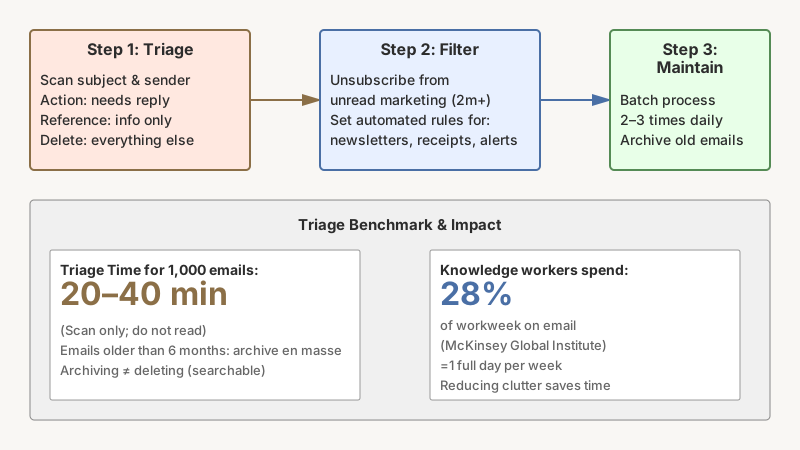
Email was supposed to make communication faster and easier. For most people, it has done the opposite — creating an ambient anxiety that never quite switches off. If you open your mail client and feel a small dread before you even start reading, you are not alone. Studies by the McKinsey Global Institute have found that knowledge workers spend roughly 28% of their workweek reading and answering email. That is more than a full day, every week, just on messages.
The good news: a cluttered inbox is not a personality flaw. It is an engineering problem, and it has an engineering solution. This guide walks you through clearing the backlog, building a system that keeps it clear, and breaking the habits that filled it up in the first place.

Step 1 — Triage the Existing Backlog
Before you can build a better system, you need to deal with what is already there. Most people stall because they try to read every email as they sort. That is the wrong order of operations.
The Folder-First Approach
Create three temporary folders (or labels in Gmail): Action, Reference, and Delete. Then go through every email — quickly — and ask one question: does this need a reply or an action from me? If yes, Action. If it is useful information but needs no reply, Reference. Everything else, Delete.
Do not open individual threads to read them in full. Scan the subject line and sender. If you feel the urge to read something carefully during triage, resist it. You can read the Action folder later.
A rough benchmark: for an inbox with 1,000 emails, this sorting pass should take 20–40 minutes, not hours.
Declare Inbox Zero — With an Asterisk
Once everything is sorted, archive or move the Reference folder into a separate archive mailbox. The emails are not gone — they are searchable — but they are out of your primary view. Search is good enough now that filing by topic is mostly unnecessary overhead.
For many people, the single biggest psychological unlock is realizing that archiving is not deleting. You are not throwing anything away; you are moving it off the stage.
Handle the Oldest Stuff Ruthlessly
If you have emails older than six months that have never been acted on, the honest truth is: they will never be acted on. Archive the entire block in one move. If something genuinely mattered, the other party has likely already followed up or found another solution.
Step 2 — Unsubscribe, Block, and Filter
Clearing the backlog is satisfying. Keeping it clear is the harder, more important part. Most inbox clutter is not personal email — it is marketing, notifications, newsletters, and automated alerts. These messages share one trait: they were invited in at some point, and they have never been formally uninvited.

The Unsubscribe Session
Schedule a single 30-minute block. Open your inbox and filter by the word “unsubscribe” — nearly every marketing email contains it. Work through the results oldest-to-newest and unsubscribe from anything you have not read in the past two months.
Services like Unroll.me (available in the US) consolidate this process, though it is worth reading their privacy policy before connecting your account, as they have historically shared anonymized data with partners. Alternatively, Gmail’s built-in unsubscribe prompts and Apple Mail’s unsubscribe links at the top of messages do the job without a third-party tool.
Filters and Rules Are Your Passive System
After unsubscribing from what you can, set up filters for what remains. Good examples:
- All newsletters from a specific domain → skip inbox, go to a “Reading” label
- Order confirmations and receipts → skip inbox, go to “Receipts”
- Automated alerts from project tools (Jira, GitHub, Asana) → skip inbox, go to a dedicated label
- Any email with “no-reply” in the sender → archive immediately
The goal is that your inbox surface — the first thing you see — contains only messages from real people who need a real response. Everything else is sorted passively.
Use a Separate Address for Signups
Going forward, give out a secondary email address when websites ask for one. A free Gmail or ProtonMail account works well as a “junk” address for e-commerce signups, giveaways, and anything you expect to spam you. Your primary address stays reserved for people, not services.
Step 3 — Build a Maintenance Routine
Systems do not maintain themselves. The inbox decluttering literature is full of people who achieved Inbox Zero and then returned to 3,000 messages within three months. What they lacked was a scheduled maintenance loop.
Batch Processing, Not Constant Checking
The default behavior — checking email every time a notification fires — is the root cause of inbox creep. It is also cognitively expensive: every context switch costs time to re-enter focus. Research from the University of California, Irvine by Gloria Mark and colleagues has documented that it takes an average of over 23 minutes to fully return to a task after an interruption.
Instead, designate 2–3 fixed times per day when you process email. Outside those windows, close the tab or mute notifications. This single change reduces the felt urgency around email more than any other technique.
The Two-Minute Rule
This rule comes from David Allen’s Getting Things Done methodology. If a message requires an action that takes less than two minutes to complete, do it immediately during your processing window. If it takes longer, move it to a task manager (Todoist, Things, Notion, a physical notebook — whatever you actually use) and archive the email. Do not use your inbox as a to-do list; it is a terrible one.
Weekly Review
Once a week — Friday afternoon works well for many people — spend ten minutes scanning the Action folder. Reply to anything still pending, close out completed items, and archive what is no longer relevant. This review prevents the folder from becoming a second inbox.

Pairing this weekly review with broader habits from Simple Ways to Stay Organized at Work (That Actually Stick) can help the inbox discipline stick alongside the rest of your work routine.
Step 4 — Rethink the Tools
Sometimes the problem is not behavior but the tool itself.
If your inbox chaos is really a symptom of a bigger workspace problem, 12 Tips for Organizing a Home Office That Actually Works tackles the physical clutter that often mirrors a messy digital setup.
Email Clients Worth Considering
Gmail remains the most feature-rich free option, with powerful filters, Priority Inbox, and strong search. Superhuman is a paid client (subscription-based) that builds triage keyboard shortcuts and AI summaries into its core workflow — worth it for power users who live in email. Hey (from Basecamp) takes a more radical approach: new senders go into an “Imbox” only after you approve them, effectively making your inbox an opt-in list. Apple Mail integrates well across Apple devices and its Focus filter in macOS and iOS can suppress email notifications during deep work hours.
None of these tools fixes underlying habits, but a client that matches how you actually work can reduce friction significantly.
When to Move Off Email Entirely
For some categories of communication, email is genuinely the wrong medium. Internal team coordination that happens over email is almost always better handled in Slack, Microsoft Teams, or a project management tool. If your team switches recurring project threads to a shared tool, you eliminate a whole class of email that was never suited for the format.
Common Mistakes That Undo the Work
- Keeping emails as reminders. The inbox is not a calendar. Star it, add it to a task manager, then archive it.
- Sorting instead of archiving. Creating elaborate folder hierarchies is procrastination. Search is faster than browsing folders.
- Unsubscribing during triage. Handle unsubscribes in a dedicated session, not mid-sort — it derails your momentum.
- Treating mobile notifications and desktop as separate systems. Silence both, or the desktop discipline is undermined by phone buzzes.
- Going for Inbox Zero obsessively. The number is not the point. A calm, actionable inbox is the point. Some people maintain a five-email inbox and feel anxious; others keep 50 emails and feel fine. Calibrate to function, not to aesthetics.
Conclusion
Decluttering a digital inbox is not a one-afternoon project — it is a small, ongoing practice. The core moves are straightforward: triage once to clear the backlog, set up filters and unsubscribe from noise, batch your checking times, and handle short replies immediately. None of this requires expensive tools or heroic willpower. It requires a clear system applied consistently.
Start with the triage pass today. Once the surface is clear, the maintenance becomes much easier than keeping up with a flood. Most people find that after two or three weeks of the new routine, the inbox stops feeling like a source of dread — it becomes just another tool that works for you rather than against you.