How to Clean a Smartphone Screen Properly: 7 Safe Steps

Smartphone screens collect more bacteria than most people expect — one often-cited microbiological study from the University of Arizona found mobile phones carry roughly ten times more bacteria than a toilet seat. Whether or not that statistic surprises you, the practical takeaway is the same: regular, careful cleaning matters.
The problem is that a lot of people clean their phone screens wrong. Rubbing alcohol straight from a bottle, kitchen paper towels, window cleaner, even blowing on the glass — these habits either scratch the oleophobic coating that makes your screen feel smooth, or leave behind residue that attracts more grime. This guide walks through exactly what to do instead.

What You Need Before You Start
You don’t need specialist gear. Most of this you probably have already:
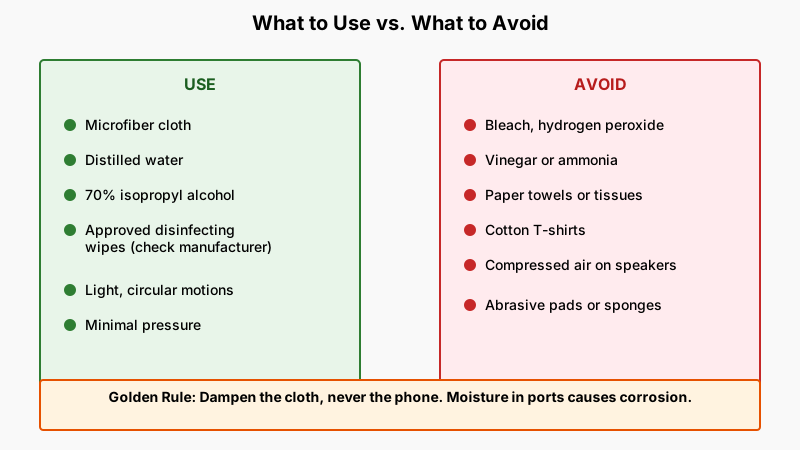
- Microfiber cloth — the same type used for eyeglasses. Do not substitute paper towels, tissue, or a cotton T-shirt; all of these carry abrasive fibres.
- Distilled or filtered water — tap water contains minerals that can leave white streaks on glass.
- Isopropyl alcohol (IPA) at 70% concentration — if you need to disinfect. Both Apple and Google explicitly recommend this concentration; higher percentages evaporate too fast and can stress the oleophobic coating over time.
- Screen-safe disinfecting wipes — products like Lysol Disinfecting Wipes or Clorox Disinfecting Wipes are approved by Apple for use on their display glass and on hard, non-porous surfaces. Check your phone manufacturer’s guidance.
- A case-free phone — always remove your case before cleaning. Grime pools underneath.
What to avoid entirely:
- Bleach, hydrogen peroxide, vinegar, and ammonia-based cleaners (e.g., Windex). Vinegar and ammonia break down oleophobic coatings.
- Compressed air canisters aimed directly at speaker grilles at close range — pressure can damage internal membranes.
- Any abrasive pad or scrubbing sponge.
Step-by-Step: How to Clean a Smartphone Screen Properly
Step 1 — Power Down and Disconnect
Turn the phone off before you start. This does two things: it eliminates any risk of accidental input, and it makes smudges and streaks far easier to see against a dark screen. Unplug charging cables and remove the case.
Step 2 — Dry-Wipe First
Fold your microfiber cloth into quarters for a firm, controlled surface. Using light, circular motions, wipe the entire screen to lift loose dust, lint, and dry debris. Don’t press hard — the goal here is just to remove anything that could scratch the glass when you introduce moisture.
Step 3 — Dampen the Cloth (Not the Phone)
Never spray or pour liquid directly onto the screen. Instead, lightly dampen one corner of the microfiber cloth with distilled water or a 70% IPA solution. The cloth should feel barely damp — if you can squeeze moisture out of it, it’s too wet. Moisture that seeps into speaker grilles, charging ports, or button gaps can cause corrosion even on water-resistant phones.
Step 4 — Wipe in One Direction
Work from the top edge of the screen to the bottom in smooth, overlapping strokes. Some cleaning guides recommend circles; going in consistent strokes is actually better for spotting missed sections and avoiding re-depositing smudges. Use minimal pressure.
Step 5 — Address Stubborn Smudges
For a persistent oily smudge — the kind left by sunscreen or lip balm — apply a tiny additional amount of 70% IPA to the cloth and hold the damp section against the smudge for two or three seconds before wiping. The alcohol needs a moment to break down the lipid. Don’t rub aggressively.

Step 6 — Dry and Buff
Use the dry section of the cloth (or a second clean microfiber cloth) to immediately dry and buff the screen. This removes any streaking from the water or IPA. Hold the phone up at an angle to the light to check for missed spots.
Step 7 — Clean the Case Separately
Clear silicone and plastic cases can be cleaned with warm soapy water and a soft brush, then air-dried completely before going back on the phone. Leather cases need a dedicated leather cleaner — water and alcohol both dry out and crack leather over time.
How Often Should You Clean Your Screen?
For most people, a quick dry-wipe every two or three days and a full damp clean once a week is a reasonable baseline. If you regularly eat while using your phone, work in dusty or outdoor environments, or share your device with others, clean more frequently.
During cold and flu season, or if someone in your household is ill, a daily wipe with an approved disinfecting wipe makes practical sense. Just don’t use the same wipe twice — fold it to a clean surface or use a fresh one.
Screen protectors deserve attention too. Tempered glass protectors can be cleaned with the same method described above. Plastic film protectors are more scratch-prone; use less pressure and skip the alcohol, which can yellow the adhesive over time.
Does Cleaning Damage the Oleophobic Coating?
This is a legitimate concern, not just marketing anxiety. The oleophobic (oil-repelling) coating on smartphone glass is a thin fluoropolymer layer — it’s what makes swipes feel slippery and stops fingerprints from bonding hard to the glass. Apple, Samsung, and most other manufacturers warn that abrasive materials and harsh chemicals erode it.
The practical reality: the coating wears down with normal use anyway. Repeated cleaning with 70% IPA accelerates that wear compared to water alone, but the difference is slow and gradual. If keeping your phone hygienically clean is important to you — and during illness or in healthcare environments, it clearly is — use IPA without guilt. When the coating eventually dulls (you’ll notice it when swipes feel slightly draggy), a screen protector restores the smooth glide.

Common Mistakes to Watch Out For
Cleaning too roughly: A common reflex is to scrub at a stubborn smudge like you’d scrub a cooking pan. The glass itself is hard, but the coating is not. Pressure doesn’t help — dwell time with alcohol does.
Using the same cloth for the screen and the back: The back of your phone picks up oils, sand, and grit from pockets and tables. Wiping that onto the screen with the same cloth introduces abrasives you can’t see.
Ignoring the camera lens: The rear camera lens gets fingerprints and dust just like the screen. Use the same microfiber method. A clean lens matters more than most people realise — even a thin film of oil reduces contrast and sharpness in photos.
Forgetting ports and edges: A dry, soft-bristle brush (an old clean toothbrush works) can dislodge lint from charging ports and speaker grilles. Don’t use anything metallic or pointed.
Putting the case back on while the phone is still damp: Even a small amount of trapped moisture under a tight silicone case can cause problems over weeks. Give it a minute to air dry.
If you’re on a cleaning streak, our guide How to Clean a Keyboard Properly: The No-Disassembly Five-Minute Fix tackles another gadget surface that collects grime just as fast.
A Quick Note on Manufacturer Guidelines
Always check your phone maker’s official cleaning guidance — it’s usually on their support website. Apple, Google (Pixel), and Samsung have all published specific cleaning recommendations for their devices. These pages are updated when new models launch, so they reflect the actual materials used. A 2020-era recommendation for an older glass formulation may not match the guidance for a current device with a matte or ceramic finish.
Conclusion
Cleaning a smartphone screen properly comes down to three habits: use the right tools (microfiber, not tissue), use the right chemistry (water or 70% IPA, not household cleaners), and apply moisture to the cloth rather than the phone. None of it is complicated, but the small details — like buffing dry immediately, or not sharing the cloth between the back and the screen — make a real difference to both hygiene and the long-term feel of the glass.
A two-minute clean once a week is enough for most people. The phone you carry everywhere deserves at least that.